
eTree GUI
Disk space and directory visualizer for Windows. Scan any drive or folder, see at a glance what takes up the most room, and find duplicate files you can safely clear out. An optional AI Copilot answers questions about your folders, using a free local model or your own cloud AI key.
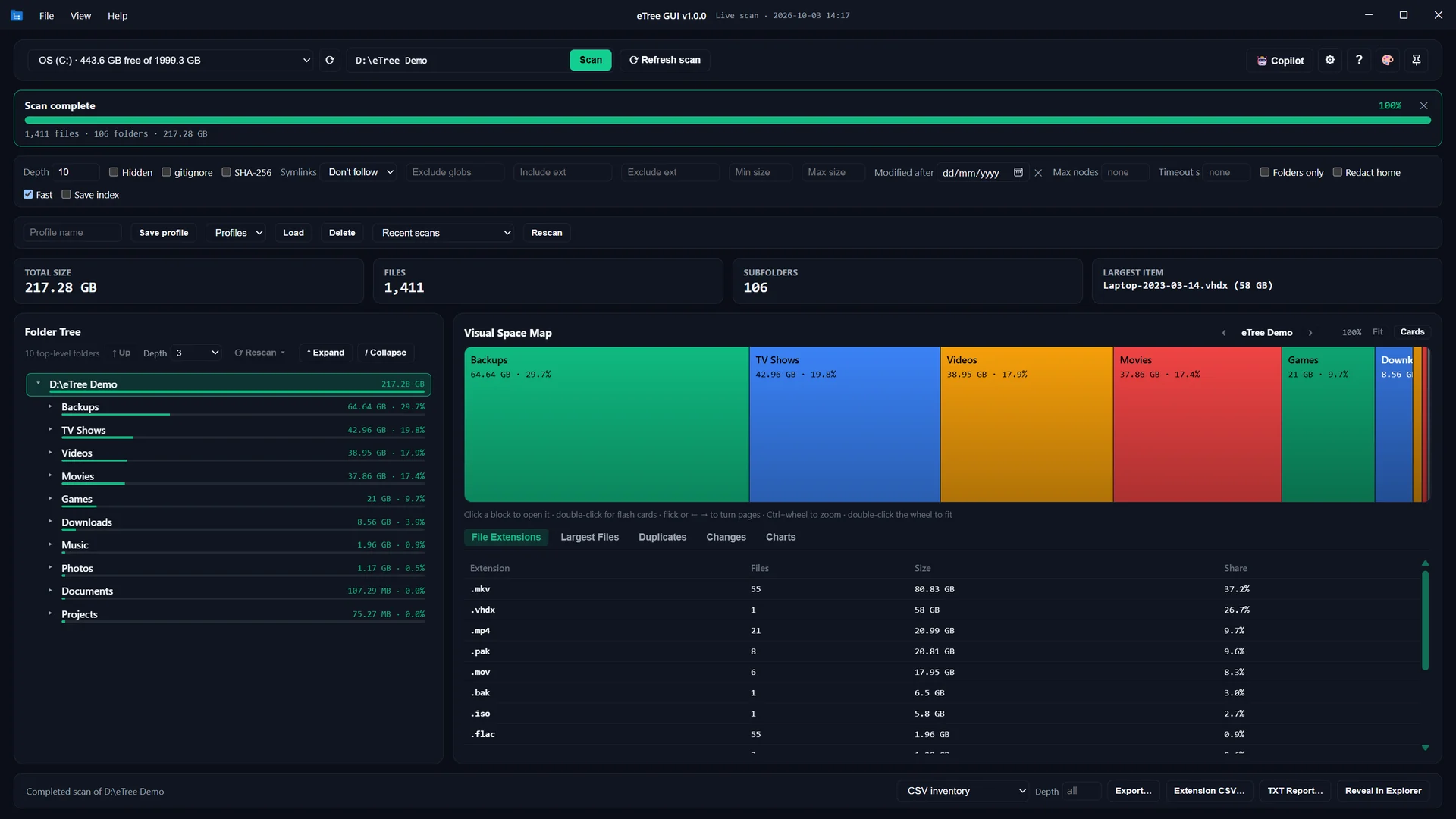
Scan overview: folder tree, space map, totals and file types for a 217 GB demo drive
>_ What eTree GUI Does
Everything you need to understand a full drive and win back space, in one window:
⚡ Fast Scanning
A native Rust engine reads file metadata in parallel. Stop at a depth or file limit, cancel a long scan at any time, and rescan any folder deeper later without starting over.
🗺️ Treemap & Folder Tree
The space map draws every folder in proportion to its size, so the biggest blocks show where the space went. The folder tree ranks each subfolder by size, file count and share of the total.
🧬 Duplicate Finder
Turn on SHA-256 and identical files are grouped by content, with how many copies exist and how much space you would get back. Reveal any copy in Explorer, or export the full list to CSV.
📊 Charts & Reports
Bar charts, 3D pies and histograms for any folder, a file-type breakdown, and the largest files. Export Excel reports with charts, PDF reports, or CSV, TSV, JSON, Mermaid, Graphviz DOT, HTML and TXT.
🔄 Snapshots & Refresh
Save a scan as one file and reopen it without reading the disk. Refresh rereads the folder and lists exactly what was added, removed or changed since.
🤖 AI Copilot (Optional)
Ask about your folders in plain words, such as "what can I archive?". Use a free local model (Ollama, LM Studio) that never leaves your PC, or your own key for OpenAI, Google Gemini, Anthropic Claude, DeepSeek, xAI Grok, Mistral AI, Groq or OpenRouter.
🔒 Offline & Private
No telemetry and no data collection. Nothing goes online unless you ask the Copilot a question with a cloud provider you chose, and then only a summary of folder names, sizes and dates, never file contents. API keys are encrypted by Windows and stay on your PC.
🧰 Built for Clean-ups
Filters by extension, glob, size and date; .gitignore support; saved profiles and recent scans; a drive overview with free space; 23 light and dark themes; and Always on top while you tidy up.
>_ Watch the Tour
A three-minute walk through a scan, the space map, the AI Copilot, duplicates, Refresh and themes (captions included).
>_ Technical Specifications
| Version | 1.0.1 |
|---|---|
| Platform | Windows 10 (version 1809, build 17763, or later) and Windows 11, x64 |
| Requires | Microsoft Edge WebView2 runtime (included in Windows 11 and current Windows 10) |
| Built with | Rust and Tauri v2, sharing the etree-core engine with the eTree command-line tool |
| Distribution | Microsoft Store (Store ID: 9PNNKCXBWGQJ, Utilities & tools › File managers) |
| Exports | CSV, TSV, JSON, Mermaid, Graphviz DOT, HTML inventory, TXT summary, Excel (with charts), PDF |
| Duplicate detection | SHA-256 content hashing (optional) |
| AI Copilot | Optional. Local: Ollama, LM Studio. Cloud (your own key): OpenAI, Google Gemini, Anthropic Claude, DeepSeek, xAI Grok, Mistral AI, Groq, OpenRouter |
| Privacy | No telemetry, no accounts, no ads. Reads only the folders you choose and never modifies or deletes files. |
| Price | US$9.99, one-time purchase on the Microsoft Store (local prices in the Store) |